How to Accept Credit Card Payments as a Contractor Without Losing Your Margin
Pay links, fees by payment method, surcharge rules and who should carry the fee. Includes the math on a $4,800 job paid by card.
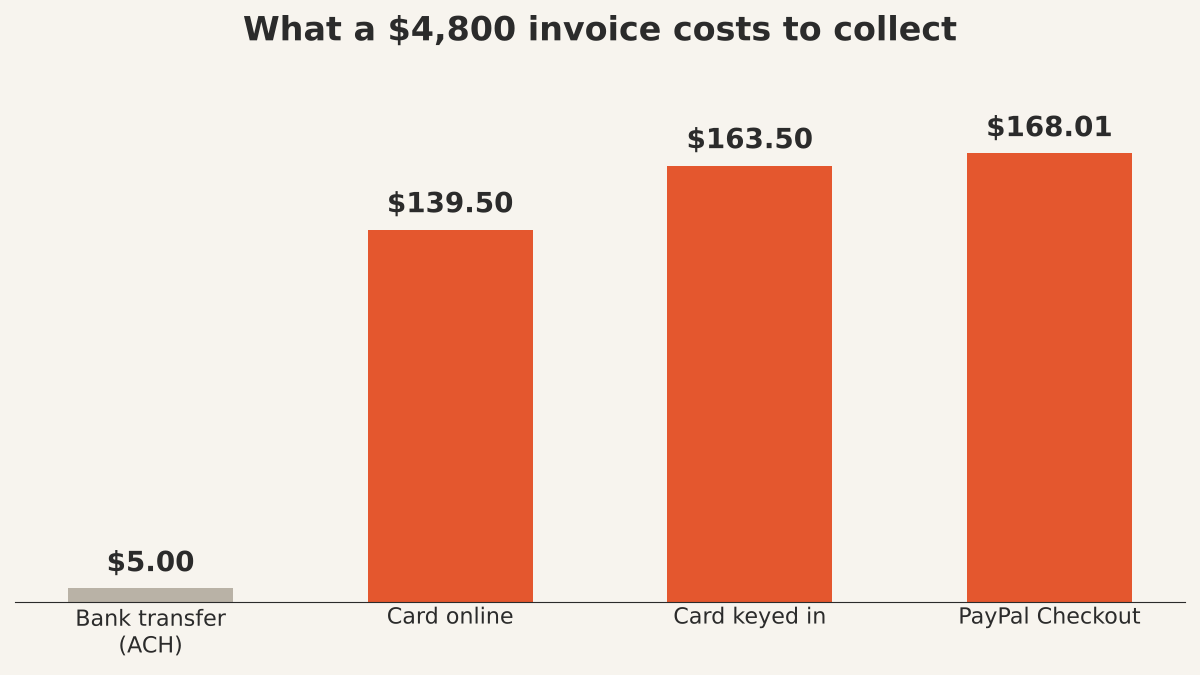
To accept credit card payments as a contractor, put a pay-online link on every invoice through a payment processor, decide up front who carries the fee, and send big balances to bank transfer. The fee is the part that bites: Stripe's standard rate is 2.9% + 30¢ per domestic card payment, so a $4,800 invoice paid by card costs you $139.50 to collect.
Card fee = invoice × rate + fixed fee. Price it in, or it comes out of your profit.
$4,800 × 2.9% + $0.30 = $139.50. On a job priced at a 25% margin, that turns $1,200 of profit into $1,060.50. Hypothetical, worked below.
Customers want to pay with a card. They get points, they get a dispute button, and they don't have to find a checkbook.
Saying no costs you jobs. Saying yes without a plan costs you about three cents of every dollar.
This guide covers the ways small trade businesses take cards, what each one costs, the surcharge rules, and the math on one job. US rules and fees, checked October 15, 2026.
1. The three ways contractors take card payments
Most solo and small trade businesses use one of three setups. They differ in who you sign up with and how the customer pays, not in whether the fee exists.
- A pay link on the invoice. Your invoicing app connects to a processor, and the customer taps a link and pays online. No hardware, no card numbers in your hands. This is the one that fits most service work, because the invoice and the payment live on the same job.
- A card reader or tap-to-pay on your phone. For when the customer wants to pay at the truck. In-person rates differ from online rates, so check your processor's table; the win is being paid before you leave.
- A merchant account from your bank. A traditional setup with its own contract, statement and sometimes monthly fees. It can make sense at high volume. For a one-truck business it's usually more paperwork than it saves.
Whatever you pick, avoid taking card numbers over the phone and typing them in. Stripe, for one, adds 0.5% for manually entered cards on top of the 2.9% + 30¢ (Stripe pricing, checked October 15, 2026). Send the link instead and let the customer type their own card.
2. What card payments actually cost
You pay a percentage plus a fixed fee on every payment, and the percentage changes with how the customer pays. Here are published standard rates for a $4,800 invoice, checked October 15, 2026.
| How the customer pays | Published rate | Cost on $4,800 |
|---|---|---|
| Bank transfer (Stripe ACH Direct Debit) | 0.8%, $5 cap | $5.00 |
| Card online (Stripe, domestic) | 2.9% + 30¢ | $139.50 |
| Card keyed in by you (Stripe) | 3.4% + 30¢ | $163.50 |
| Card or Apple Pay on a PayPal invoice | 2.99% + 49¢ | $144.01 |
| PayPal Checkout or Venmo on a PayPal invoice | 3.49% + 49¢ | $168.01 |
Sources: Stripe pricing and PayPal business fees (invoicing transaction rates; the US fixed fee is $0.49). Other processors publish their own rates; the shape is the same.
Two more costs show up less often but hurt more. A disputed payment (a chargeback) costs $15 at Stripe whether you win or lose, plus another $15 if you contest it, which comes back only if you win. And international cards cost extra, which matters only if your customer's card was issued abroad.
3. Who pays the fee: absorb it, price it in, or surcharge
You have three choices, and the best one for most contractors is to price the fee into the job before the estimate goes out. Here's how each one works.
Absorb it. Simplest, and fine on small invoices. On a $300 service call the fee is $9. On a $4,800 job it's $139.50 straight off your profit, which is why absorbing stops making sense as jobs get bigger.
Price it in. Treat the card fee like any other job cost. If your price is cost ÷ (1 − margin), add the card rate to what you take off: price = (cost + 30¢) ÷ (1 − margin − 2.9%). Everyone pays the same number, nobody sees a fee line, and your margin holds when they pay by card.
Surcharge it. Add a card fee as its own line. It's legal in most states, with rules, and it's the option most likely to start a conversation you didn't want. Section 4 has the rules.
The profit margin calculator shows margin and markup side by side for any cost, which helps when you're deciding how much room a fee eats.
4. Credit card surcharge rules for contractors
You can add a surcharge to credit cards in most of the US, but only on credit cards, only up to your actual cost or 3%, whichever is lower, and only with notice. Those are Visa's rules, from its merchant surcharging Q&A:
- Tell your payment provider (Visa calls it the acquirer) at least 30 days before you start.
- Surcharge credit cards only. Debit and prepaid cards can't be surcharged, even when the customer picks "credit" at the reader.
- Cap it at your merchant discount rate for that card or 3%, whichever is lower. If your processor charges 2.9% + 30¢, that's about 2.91% on a $4,800 invoice, so 3% is over the line.
- Disclose it where the customer starts paying, at the point of sale, and as a separate line on every receipt.
State law comes on top. As of February 15, 2024, Visa says Connecticut, Maine, Massachusetts, Oklahoma and Puerto Rico prohibit surcharging, and Colorado, Minnesota, New Jersey and New York have their own requirements. Visa itself says that list may not be complete, so check your state's current rule before you add the line.
A cash or check discount is the other route: one listed price, and a discount for paying another way. Visa allows it with its own display rules. It reads friendlier than a surcharge and does the same job.
This is general information, not legal advice. Check your state and your processor's terms.
5. Worked example: a $4,800 bathroom vanity and tile job
Hypothetical job: $3,600 in costs (materials, loaded labor and overhead), priced at a 25% margin. The customer pays the full balance by card through an online pay link at Stripe's standard rate.
| Option | Invoice | Card fee | Profit | Margin |
|---|---|---|---|---|
| No fee (check or cash) | $4,800.00 | $0.00 | $1,200.00 | 25.0% |
| Absorb the card fee | $4,800.00 | $139.50 | $1,060.50 | 22.1% |
| Price the fee in | $4,994.00 | $145.13 | $1,248.87 | 25.0% |
| Bank transfer for the full balance | $4,800.00 | $5.00 | $1,195.00 | 24.9% |
The math. Absorbing: $4,800 × 0.029 + $0.30 = $139.50, and $1,200 − $139.50 = $1,060.50. Pricing it in: ($3,600 + $0.30) ÷ (1 − 0.25 − 0.029) = $4,993.48, rounded to $4,994; the fee on $4,994 is $145.13, which leaves $1,248.87, or 25.0%.
So pricing it in costs the customer $194 more than the cash price and keeps your margin whole. Absorbing costs you $139.50 on every job like this. Ten of them a year is a nice used trailer.
A middle path that works: take the deposit by card (30% of $4,800 is $1,440, a $42.06 fee) and ask for the $3,360 balance by bank transfer ($5 at the 0.8% capped rate). Total collection cost $47.06 instead of $139.50. How to set up deposits and milestones is in contractor payment terms.
6. Put the payment terms on the estimate, not the invoice
The customer should know how they can pay, and what a card costs, before they sign. Write it on the estimate: accepted methods, any surcharge or cash discount, when each payment is due. Then the invoice is just the bill they already agreed to.
On the invoice itself, include the pay link, the due date in words, and the methods you take. What else belongs there (job address, line items, change orders, deposit credit) is in how to invoice as a contractor. On bigger jobs billed in stages, put the link on every progress bill; the setup is in progress billing.
Recurring work deserves a note too. A commercial account billed monthly, like the maintenance contract in how to price commercial lawn care, is exactly where a $5 bank transfer beats a 2.9% card fee twelve times a year.
7. Chargebacks: the paperwork that wins them
A chargeback happens when the customer tells their card issuer they didn't get what they paid for. The disputed amount is held back from you while it's argued, and you pay the dispute fee either way.
You win these with paper: a signed estimate with the scope, written change orders for anything added, dated photos of the finished work, and the invoice that matches all three. If a customer added a niche halfway through on a handshake, that's the line they'll dispute. Write the change order before you build it.
Where WinPal fits
WinPal is a mobile and web app for contractors that handles estimates, invoices and payments. You can invoice from your phone and let clients pay online by card, Apple Pay or PayPal. WinPal doesn't add a fee on top; the standard processor fee applies, as the pricing page explains.
Common questions about taking cards
Can a contractor charge a credit card fee?
Yes in most states, within card network rules. Under Visa's rules you can surcharge credit cards only, never debit or prepaid, up to your actual processing cost or 3%, whichever is lower, with 30 days' notice to your provider and clear disclosure. Some states ban or limit surcharges, so check yours first.
Should a small contractor accept credit cards?
Usually yes. Customers expect it, you get paid at the job instead of waiting on a check, and the fee is manageable if you price it in. Take cards for deposits and smaller invoices, and offer bank transfer for large balances, where the fee is a few dollars instead of a few hundred.
What is the cheapest way to get paid on a big job?
Bank transfer. Stripe's ACH Direct Debit is 0.8% capped at $5, so a $4,800 balance costs $5 instead of $139.50 by card. Checks cost nothing to process but cost you days waiting and a trip to the bank. Put the cheaper option on the estimate so the customer chooses it up front.
Can I take a card number over the phone?
You can, but it costs more. Stripe adds 0.5% for manually entered cards, and you end up holding a customer's card number. Send a pay link by text or email instead, so the customer enters their own card details.
Do I need a merchant account to accept cards?
No. You can use a payment processor connected to your invoicing app, which works without a separate merchant account, setup fee or monthly statement. A bank merchant account can pay off at high monthly card volume; compare the total cost, not just the percentage.
What to do before your next invoice
Pick your rule for the fee (absorb, price in or a legal surcharge), write it and your payment methods on the estimate, and send every invoice with a pay link.
Want estimates, invoices and online payments on the same job, sent from your phone? Get started with WinPal.