Construction Change Orders: How to Write, Price and Get Paid for Extra Work
What goes on a change order, how to price extra work, and what it does to your payment schedule. With an $800 shower niche on a $12,000 remodel.

A construction change order is a written, signed agreement to change the scope, price or schedule of a job after the contract is signed. Write one before you do any extra or changed work: what's changing, why, the price added or credited, the days added, and the new contract total. You and the customer sign it, then you start.
New contract total = original contract + approved change orders − approved credits.
A $12,000 bathroom remodel plus an $800 change order for a shower niche: $12,000 + $800 = $12,800.
Extra work you did on a verbal "sure, go ahead" is the easiest money in the business to lose. The customer remembers a favor. You remember six hours and $150 of materials.
This guide is for residential trade contractors and remodelers working directly for homeowners, with a short section for subs working under a GC. All amounts are in US dollars and the example is hypothetical. Change order rules vary by state, so we link the official source we cite and tell you where to check.
1. What is a change order in construction?
A change order is a written amendment to a construction contract that adds work, removes work or changes how it's done, and states the price and time effect. Once you and the customer both sign it, it becomes part of the contract. On commercial jobs with an architect, the owner, architect and contractor all sign.
That last part matters if you ever bid commercial work. The AIA's standard change order form is G701, and AIA describes a change order as a written modification "signed by the owner, architect, and contractor, that adjusts the contract sum, the contract time, or both" (AIA Contract Documents).
For a kitchen or a bathroom, the parties are you and the homeowner. Same idea, less paper, and each signed change order becomes its own line on your final invoice.
2. When do you need a change order?
Any time the work, the price or the finish date moves away from what the contract says. If you'd have to explain it on the final invoice, write it up now.
- The customer adds or changes something: a niche in the shower, a different tile, two more outlets.
- You find something nobody could see: rotted subfloor, ungrounded wiring, a joist somebody notched in 1987.
- An allowance runs over or under: they picked a $900 vanity against a $600 allowance.
- The inspector asks for something outside your scope: extra blocking, a GFCI the old work never had.
- Work comes out: the customer buys the light fixtures themselves. That's a change order too, with a credit.
California spells it out for home improvement work. The state's contractor board guide says change orders are required to perform extra or changed work, they can also remove items from the original agreement, and all change orders must be in writing (CSLB, A Contractor's Guide to Home Improvement Contracts). Other states set their own rules, so check with your contractor board.
3. What goes on a change order?
Enough that a stranger could read it a year later and know what changed, why, what it cost and who agreed. In California, a home improvement change order must describe the scope of the extra work or change, the cost added or subtracted, and the effect on the schedule of progress payments. It becomes part of the contract once it's in writing and signed by both of you before that work starts (CSLB).
- Change order number and date: #1, #2, #3, in order.
- Job and contract reference: customer, job address, contract or estimate number and date.
- What's changing: the scope in plain words, with sizes and materials.
- Why: customer request, hidden condition, allowance, inspector.
- Price: labor and materials, or one number for the change, added or credited.
- Time: days added to the schedule, or "no change."
- Payment effect: which payment it's billed with.
- New contract total: the original price plus every approved change so far.
- Signatures and dates: yours and the customer's, before the work starts.
Photos help. A picture of the rotted subfloor attached to the change order ends most arguments before they start.
4. How do you price a change order?
The same way you price the original job: add up what the change costs you, then divide by one minus your margin. Price = cost ÷ (1 − margin). It's the same math as estimating construction costs for the whole job, on a smaller scope.
Then count what's different about extra work. A change in the middle of a job costs more than the same work planned from day one:
- A second trip to the supply house for one niche insert and a box of tile.
- Re-sequencing: the tile setter comes back a day later, the plumber's trim-out moves.
- Your time writing it up and walking the customer through it.
- Days added to the schedule that push your next job.
Don't discount it because "we're already here." You're already here doing the job they agreed to. The change is new work, and it's priced like new work.
Not sure what margin you're actually keeping? The profit margin calculator turns your cost and target margin into a price, and shows what a discount does to it.
5. Worked example: an $800 shower niche on a $12,000 remodel
The job (hypothetical): a $12,000 bathroom remodel on a four-week schedule, with payments of 10% at signing, 30% when demo is done, 40% when rough-in and tile are done and 20% at the final walk-through. That's the same schedule we use in our guide to contractor payment terms.
In week two, before tile starts, the customer asks for a recessed shower niche. You estimate 6 hours of labor at a loaded cost of $60 an hour, and $150 of materials (niche insert, waterproofing, extra tile and trim). You price labor at a 40% margin and materials at 25%.
| Line | Your cost | Margin | Price |
|---|---|---|---|
| Labor: frame, waterproof and tile a recessed niche, 6 hr × $60 | $360 | 40% | $600 |
| Materials: niche insert, waterproofing, tile and trim | $150 | 25% | $200 |
| Change order #1 | $510 | $800 |
The math: $360 ÷ (1 − 0.40) = $600. $150 ÷ (1 − 0.25) = $200. Together, $800 for work that costs you $510, so $290 of it is profit.
The change order also says what it does to the schedule and the payments. One day added. The $800 is billed with the rough-in and tile payment, so the money arrives with the work it pays for.
| Payment | Original | With change order #1 |
|---|---|---|
| Contract signed (10%) | $1,200 | $1,200 |
| Demo done (30%) | $3,600 | $3,600 |
| Rough-in and tile done (40%) | $4,800 | $5,600 |
| Final walk-through (20%) | $2,400 | $2,400 |
| Contract total | $12,000 | $12,800 |
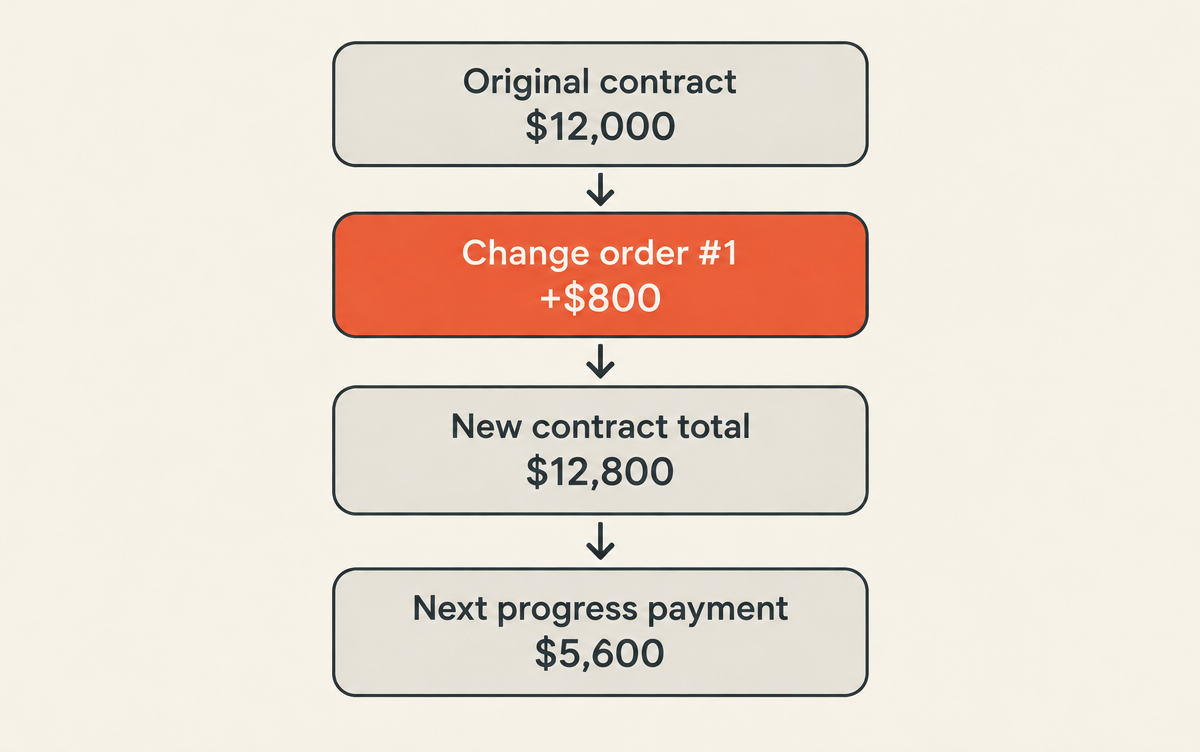
Check it before you send: $1,200 + $3,600 + $5,600 + $2,400 = $12,800. If the payments don't add up to the new contract total, the change order is missing from one of them.
Now picture the same niche on a verbal yes. You've put $510 of your money in the wall, and the conversation about the $800 happens at the final walk-through. That's the worst time to have it.
6. What's the change order process on the job?
Stop, write it, price it, get it signed, do it, bill it. In that order, every time, even for a $150 change.
- Stop before you start the extra work. Finish what's in scope if you can.
- Write it up on the spot: what, why, photos.
- Price it with your normal cost and margin, plus days added.
- Get it signed by the customer before the work starts, on paper or electronically if your state allows it.
- Do the work.
- Bill it with the payment named on the change order, as its own line.
On the invoice, each change order shows up as its own line with its number and approval date. Our guide to invoicing as a contractor shows one on a finished invoice: a $380 subfloor repair on a $4,800 job.
In WinPal you can price the extra work as its own estimate from your phone before you start, then invoice it with the next payment and let the customer pay online.
7. What if the customer won't sign, or says it was included?
Then the original contract decides. Pull it out and read the scope together. If the niche isn't in it, it's extra; if your scope just says "tile shower," you've found the real problem.
A few rules that keep this from getting ugly:
- No signature, no start. If they won't sign, don't do the work. Write down that you offered it and they declined.
- Hidden conditions get photos first. If the rot has to be fixed before you can close the wall, show it, price it and get the yes before you rip it out.
- Write tight scopes. "Tile shower walls to 7 ft with customer-selected 12x24 porcelain, no niche, no bench" leaves nothing to argue about.
- Price likely surprises up front as "if we find" lines, so the change order is a number the customer has already seen.
8. Change orders when you work for a general contractor
As a sub, you'll often be told to proceed before the price is agreed. Get that direction in writing, track your hours and materials on the changed work every day, and price it as soon as you can.
On AIA-form projects that written direction is a construction change directive (G714). AIA describes it as a written order from the owner, prepared by the architect, telling the contractor to proceed with changed work before the parties agree on cost or schedule (AIA Contract Documents). The price gets settled later, which is why your daily records matter.
Also read when approved changes get paid. Retainage and pay-when-paid clauses apply to change orders too; we cover both in contractor payment terms.
Common questions about change orders
What is the difference between a change order and a change directive?
A change order is agreed and signed by both sides, with price and time settled. A change directive tells the contractor to proceed with changed work before the price or schedule is agreed. On AIA projects they're G701 and G714. Directives settle the cost later, so keep daily records of labor and materials on that work.
Can a contractor charge for a change order?
Yes. A change order is extra or different work, priced like any other work: your labor, materials and overhead, plus your margin. You can also charge for the time it takes to write it up and re-plan the job. Put how you price changes in your contract, so it's never news.
Is a verbal change order valid?
It depends on your state and your contract, and it's always hard to prove. For home improvement work, California's contractor board says all change orders must be in writing, and they become part of the contract once both parties sign before the work starts. Anywhere else, a signed page beats your memory of a conversation.
Do small jobs need change orders?
Yes, and they're quicker to write. On a $400 repair or a pressure washing job, the customer who adds "the back patio too" on the day gets a one-line change order with a price before you start. A text the customer replies "approved" to is better than nothing; a signed estimate is better still.
Who pays for a change order caused by a hidden condition?
Usually the customer, if your contract says hidden conditions are excluded and will be priced as change orders. That's why the clause matters. Without it, you're arguing about whether you should have known. Name the common ones in your scope (rot, old wiring, undersized drains) and say how you'll price them.
What to do before the next "while you're here"
Print or save a change order form with the nine lines from section 3. Next time the customer asks for one more thing, stop, write it, price it, get the signature, then do it and bill it with the next payment.
Want the estimate, the extra work and the invoice for the same job in one place on your phone? Get started with WinPal.